Images are one of the most overlooked parts of website optimization. While businesses spend countless hours improving page speed, writing content and optimizing keywords, many still publish images without proper alt text. The result is missed opportunities for accessibility, weaker image search visibility and a poorer experience for people using screen readers or other assistive technologies.
In this article, you’ll learn the difference between alt text, alt descriptions and long descriptions; discover how screen readers use image descriptions; understand the role of alt text in SEO and AI search; review current accessibility statistics and legal considerations; and learn best practices for writing high-quality image descriptions. We’ll also show how tools like AltTag.io can simplify the process by generating contextual alt text directly inside WordPress, eliminating much of the repetitive manual work while still allowing full editorial review.
Is alt text actually necessary?
Yes—for informative and functional images.
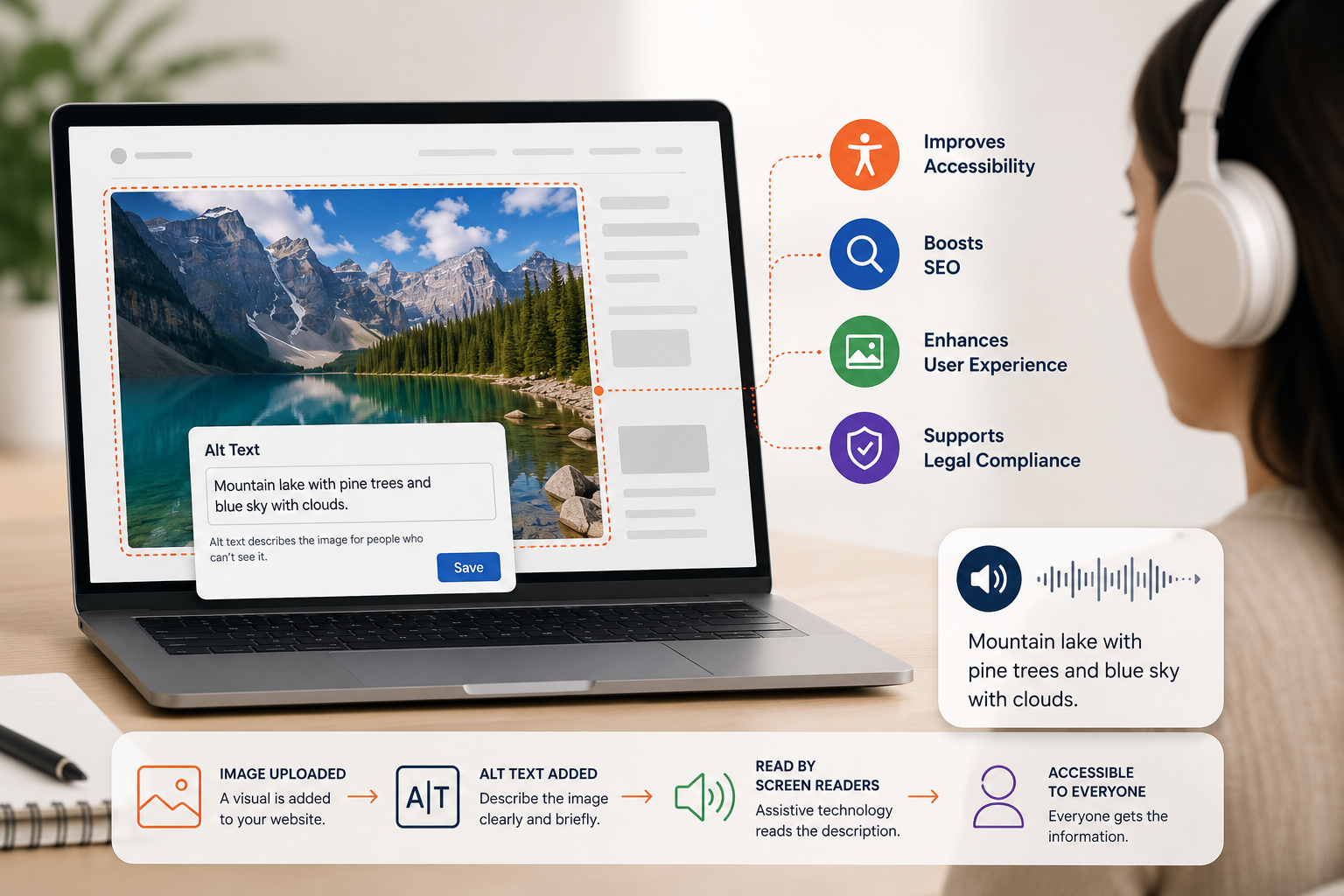
Alt text gives people using screen readers an equivalent understanding
of an image, helps when images fail to load or bandwidth is limited,
and gives Google useful metadata about image subject matter. Decorative
images are the exception: they should normally use an empty alt
attribute, written as alt="", so assistive technology can
skip them.
Images can explain a product, demonstrate a repair, show a location, communicate a chart or make a page easier to understand. But an image without a useful text alternative can become missing information for someone who cannot see it.
This matters to people who are blind, have low vision, use braille displays, browse with images disabled, experience a failed image load or rely on a slow connection. It also matters to search engines. Google states that alt text is the most important image attribute for providing additional metadata and uses it with page content and computer-vision systems to understand an image.
Alt Text, Alt Tags and Alt Descriptions: What Is the Difference?
These terms are often used interchangeably, but they do not always mean exactly the same thing.
| Term | What it means | Where it appears |
|---|---|---|
| Alt text | The written text alternative that communicates an image’s meaning or function. | Inside the HTML alt attribute or an equivalent CMS field. |
| Alt attribute | The actual HTML attribute used on an <img> element. |
<img alt="..."> |
| Alt tag | A common marketing term for alt text. Technically, it is an attribute—not a separate HTML tag. | SEO tools, WordPress plugins and everyday conversation. |
| Alt description | A general phrase that may refer to alt text, especially inside a CMS media library. | CMS fields, accessibility tools and editorial workflows. |
| Long description | A detailed text equivalent for a complex image that cannot be represented adequately in a short alt value. | Adjacent page content, an accessible table, expandable section or linked page. |
| Caption | Visible supporting information for all readers. A caption does not automatically replace alt text. | Displayed directly beneath or beside the image. |
<img
  src="mobile-tire-technician-edmonton.jpg"
  alt="Technician installing a winter tire on a customer's vehicle in Edmonton."
  width="1200"
  height="800"
>
The code does not need to describe every pixel. It needs to replace the information the image contributes in that specific context. Harvard’s accessibility guidance emphasizes that the same image may require different alt text on different pages because context changes which details matter.
We Reviewed 50 Business Websites. Alt Text Was Missing on 80% of Them.
Published accessibility studies show that missing alternative text remains widespread. To understand how often the issue appears in everyday business websites, NetGain conducted a separate manual review of 50 homepages.
What the review measured
- Fifty publicly accessible business websites were reviewed.
- The analysis focused on the homepage of each website.
- We checked whether at least one meaningful image lacked appropriate alternative text.
- Decorative images using a deliberate empty alt value were not treated as missing.
- The study measured prevalence, not the total number of image errors on each site.
Why the finding matters
A single missing description can affect a prominent hero image, service illustration, product photograph, linked logo or call-to-action. The result shows why alt-text quality should be included in publishing workflows rather than treated as a one-time cleanup project.
Alt Text Is Still One of the Web’s Most Common Accessibility Gaps
The 2026 WebAIM Million study automatically evaluated the home pages of the top one million websites. Automated testing cannot measure every accessibility issue, but it provides a useful large-scale view of detectable failures.
of home pages
had at least one image with missing alternative text in WebAIM’s 2026 analysis.
of all detected images
were missing alternative text, excluding images intentionally using an empty alt value.
had questionable alt text
such as filenames, generic words, repetition or descriptions duplicated from nearby content.
images were analyzed
across the one-million-page sample—an average of 66.6 images per home page.
linked images
was missing alternative text, creating links without a clear accessible name.
of Canadians aged 15+
had a seeing disability in 2022—almost 2.2 million people, according to Statistics Canada.
WebAIM concluded that more than one in four images on popular home pages had missing, questionable or repetitive alternatives. The issue is therefore not limited to small or outdated websites.
Accessibility problems also create content-quality problems
A missing alt attribute can leave a screen-reader user without information, leave an image link without a meaningful accessible name and reduce the contextual signals available to image search. One technical omission can affect usability, discoverability and content quality at the same time.
What Happens When Someone With Low Vision Uses Your Website?
A person with low vision may enlarge the page, use high-contrast settings, navigate with a keyboard or use a screen reader such as VoiceOver, NVDA, JAWS or TalkBack. A screen reader converts interface text and accessibility information into speech or refreshable braille.
The user navigates
Headings, links and landmarks help the person move through the page without visually scanning it.
The screen reader reaches an image
The software announces that an image is present and reads the available text alternative.
The description supplies meaning
Useful alt text explains the information or action that a sighted user receives from the image.
The user decides what to do
The person can understand a product, activate an image link or decide whether a long description is relevant.
What does missing alt text sound like?
Behaviour varies by screen reader and browser. When an image lacks an alt attribute, assistive technology may announce the filename, URL or another unhelpful fallback. A name such as IMG_4827-final-v3.jpg does not explain a product, chart or call-to-action.
Voice search is not the same as a screen reader
Voice search lets a person speak a query or command. A screen reader reads and exposes the structure of a webpage. Browser read-aloud functions may read visible text but do not always provide the same navigation and accessibility support as a full screen reader. Alt text is primarily designed for assistive technology and non-visual access, although it can also help search systems understand the content.
How Does Alt Text Support SEO?
Google Search Central says that Google uses alt text together with computer-vision algorithms and surrounding page content to understand image subject matter. It also describes alt text as the most important image attribute for providing additional metadata.
Image understanding
Descriptive text helps Google associate an image with the page topic, nearby text and relevant image queries.
Google Images visibility
Well-optimized images can earn impressions and clicks from visual search results, particularly for products and services.
Topical context
Relevant alt text reinforces what the image contributes to the page without replacing strong copy, headings or captions.
Image-link anchor text
When an image is a link, its alt text can communicate the destination or action to users and search engines.
Content resilience
Alt text may remain visible when an image fails to load, preserving at least part of the intended information.
Better page quality
Accessible image handling is one part of producing complete, useful and technically sound web content.
Alt text is not a guaranteed ranking boost
Adding alt text does not guarantee that a page or image will rank. Search visibility also depends on image quality, page relevance, crawlability, performance, internal linking, authority, user intent and competition. Alt text improves understanding; it is not a substitute for the rest of SEO.
Should keywords appear in alt text?
A relevant search term can appear naturally when it accurately describes the image. Google explicitly advises writing useful, information-rich alt text with keywords used appropriately and in context. It also warns against filling alt attributes with repeated keywords because that harms users and may be treated as spam.
Useful and contextual
- Mobile technician repairing a punctured tire at a customer’s Edmonton workplace.
- Before-and-after view of an epoxy injection repair on a basement wall crack.
- Locked shredding bin used for recurring office document destruction.
- Black insulated garage door with four rectangular windows installed in Devon.
Generic or stuffed
- image
- photo123.jpg
- best tire repair Edmonton tire service mobile tires cheap tires
- garage door garage door Edmonton best garage door garage doors
Does Every Image Need Written Alt Text?
Every HTML <img> should have an alt attribute,
but not every image should have a spoken description. The correct
value depends on the image’s purpose.
| Image type | Recommended treatment | Example |
|---|---|---|
| Informative photograph | Write a concise description of the meaning that matters in context. | alt="Technician replacing a damaged garage door spring." |
| Functional image or icon | Describe the action or destination, not merely the visual appearance. | alt="Download the accessibility audit report." |
| Image containing essential text | Include the meaningful text unless it is already available as real text nearby. | alt="Senior discount: 10% off parts." |
| Decorative image | Use an empty alt value so screen readers skip it. | alt="" |
| Complex chart or diagram | Use short alt text plus an adjacent or linked long description. | alt="Monthly organic traffic chart. Detailed data follows." |
| Logo | Provide the organization or product name when the logo communicates identity. | alt="NetGain." |
| Image already described nearby | Use empty alt when repeating the same content would create audible clutter. | alt="" |
Missing alt and empty alt are not the same
Missing alt: the attribute is absent, which can cause assistive technology to announce a filename or URL.
Empty alt: alt="" intentionally tells
assistive technology that the image does not contribute information
and should be ignored.
How to Write Alt Text That Works for People and Search Engines
There is no single perfect character count for every image. Harvard recommends keeping alt text brief, usually one or two sentences. The Government of Canada advises concise text and recommends a long description when a complex image cannot be represented adequately in a short alternative. British Columbia’s guidance suggests trying to remain under about 15 words for ordinary images.
- Describe the image’s purpose in the current page, not every visible detail.
- Write for a person first. Use search terms only when they are accurate and natural.
- Be specific enough to distinguish the image from other images on the same page.
- Do not begin with “image of” or “photo of” unless identifying the medium is important.
- Do identify a logo, screenshot, diagram, illustration, painting or chart when the medium matters.
- Do not repeat a nearby caption, heading or paragraph word for word.
- For image links and buttons, describe the action or destination.
- Use punctuation so synthesized speech pauses naturally.
- Use empty alt for decorative images rather than inventing unnecessary descriptions.
- Review AI-generated descriptions before publishing them, especially for technical, medical or sensitive images.
Before-and-after examples
| Use case | Weak alt text | Improved alt text |
|---|---|---|
| Ecommerce product | shoe | Men’s waterproof black hiking boot with a high ankle and lugged rubber sole. |
| Local service | tire repair | Mobile tire technician plugging a tread puncture in a customer’s driveway. |
| Team photograph | our team | NetGain’s SEO and paid media team meeting around a campaign dashboard. |
| Chart | SEO graph | Line chart showing organic sessions rising from 4,200 in January to 7,600 in June. Detailed data follows. |
| Linked icon | arrow | View all shredding-industry SEO services. |
| Decorative pattern | orange dots | alt="" |
When Is a Long Description Needed?
Complex images contain more information than can reasonably fit into a brief alt attribute. W3C identifies charts, graphs, maps, flowcharts and information-heavy diagrams as common examples. In these cases, use a two-part approach: a short alternative that identifies the image and a detailed text equivalent that communicates the essential data.
Short alt text
- Identifies the type and subject of the visual.
- Summarizes the most important takeaway.
- Signals that a detailed description or data table follows.
- Remains concise enough for efficient audio navigation.
Long description
- Provides trends, categories, axes and important values.
- Can use paragraphs, lists or an accessible HTML table.
- Should communicate equivalent information, not every decorative detail.
- Can be placed beside the image or linked clearly.
<figure>
  <img
    src="organic-traffic-growth-chart.png"
    alt="Organic sessions increased steadily from January to June. Detailed monthly data follows."
  >

  <figcaption>
    Organic sessions by month after the technical SEO launch.
  </figcaption>
</figure>

<table>
  <caption>Organic sessions from January to June</caption>
  ...
</table>
A visible data table is often the strongest solution because it can support screen-reader users, people with cognitive disabilities, users who prefer exact values and search systems that can process structured text.
Missing Alt Text Can Be More Than an SEO Problem
Alternative text is only one part of digital accessibility, but it is repeatedly identified as a barrier in accessibility complaints and lawsuits. When essential images lack useful descriptions, a person using assistive technology may be unable to understand a product, service, instruction, promotion or linked action.
Equidox reports that 5,114 lawsuits in 2025 were tied to websites, mobile applications and online services.
Equidox cites 8,667 Title III filings in federal district courts during 2025.
Private demand letters may substantially exceed the number of public court filings and often remain confidential.
The barriers identified in Equidox’s 2025 review included missing alternative text, inaccessible navigation, improper form labels, checkout barriers and inaccessible PDFs or downloadable documents. The report also notes that websites using accessibility overlays continued to face litigation because overlays do not necessarily correct underlying code and content problems.
Accessibility requires source-level work
An overlay or automated widget is not a complete legal or technical solution. Organizations still need to correct website templates, image descriptions, forms, keyboard interactions, downloadable documents and content workflows at the source.
For image accessibility, that means identifying informative, functional, decorative and complex images—and assigning the correct alternative treatment to each one.
Why proactive remediation is more practical
Accessibility becomes harder and more expensive when years of images, pages and documents are allowed to accumulate without a standard. A proactive workflow reduces the size of the backlog, creates documentation and makes accessibility part of normal content production rather than a response to a complaint.
This section is provided for general educational purposes and is not legal advice. Applicable requirements vary by jurisdiction, organization and service. Businesses should consult qualified legal and accessibility professionals regarding their obligations.
AltTag.io: Scalable Alt Text for WordPress
Writing alt text manually can be slow, repetitive and easy to postpone—especially when a website already contains hundreds or thousands of images. AltTag.io is a WordPress plugin developed and operated by NetGain to make the process easier. It generates contextual, accessibility-focused and SEO-aware descriptions inside WordPress, reducing the need to open and write every image description from scratch.
The goal is not to remove human review. The goal is to remove the repetitive manual work that prevents teams from completing the job. Editors can generate a draft, review the description, make any necessary changes and continue publishing without leaving the WordPress workflow.
WordPress-native workflow
Generate and apply descriptions without moving content between separate image tools and the media library.
Context-aware generation
The tool analyzes image content and page intent to propose clearer, more specific descriptions than generic filenames.
Bulk processing
Useful for sites with large media libraries where missing descriptions have accumulated over several years.
Accessibility-first rules
Outputs are designed to avoid common problems such as filename fallbacks, vague text and unnecessary “image of” phrasing.
Search-focused context
Descriptions can incorporate relevant product, service and page context without relying on repetitive keyword stuffing.
Auditable workflow
Teams can review generated text, identify media-library gaps and standardize image optimization across client sites.
Can AI Write Alt Text Reliably?
AI can accelerate the first draft, but the final description still requires editorial judgment. An image model may identify objects while missing the reason the image appears on the page. It may also infer details that are not visible, misunderstand technical equipment or produce language that is too long for the intended experience.
| AI can help with | Human review should confirm |
|---|---|
| Identifying visible objects, settings, colours and actions. | Which details matter in the specific page context. |
| Processing large image libraries consistently. | Whether an image is informative, functional or decorative. |
| Creating a concise first draft. | Names, technical terms, product models, locations and factual accuracy. |
| Flagging missing or weak descriptions. | Whether nearby text already provides an equivalent alternative. |
| Suggesting relevant page terminology. | That keywords are natural and not forced into every image. |
Alt Text Audit Checklist for Business Websites
- Crawl the website to identify images with missing alt attributes.
- Separate decorative images from informative and functional images.
- Review linked images first because missing alt can create unnamed links.
- Replace filenames and generic descriptions such as “image,” “graphic” or “photo.”
- Check product galleries for duplicated alt text across different views.
- Review icons used as buttons or links and provide accessible action names.
- Confirm that charts, maps and infographics have equivalent long descriptions or data tables.
- Keep important visible text as real HTML whenever possible instead of embedding it in an image.
- Use descriptive filenames and place images beside relevant page content.
- Check both desktop and mobile templates for equivalent image metadata.
- Test representative pages with VoiceOver, NVDA or another screen reader.
- Validate changes with automated tools, but do not rely on automation alone.
- Review image impressions and clicks in Google Search Console after implementation.
- Add alt-text quality checks to the publishing workflow so the problem does not return.
What should be measured after implementation?
Track the number of missing and questionable descriptions, image impressions and clicks in Search Console, accessibility audit findings, linked-image errors and the percentage of newly uploaded images that meet your editorial standard. Do not attribute every ranking change to alt text alone; measure it as part of the wider page and image optimization program.
The Main Takeaway
Alt text is needed because visual content should not become missing content when a visitor cannot see an image. It provides an equivalent route to meaning for screen-reader and braille users, supports people with slow connections or failed image loads and gives search engines more useful context about image subject matter.
The strongest approach is not to write the longest possible description or place a keyword in every image. It is to decide whether the image is informative, functional, decorative or complex—and then provide the correct alternative for that purpose.
Alt Text and Alt Description FAQs
Concise answers for business owners, marketers, designers and WordPress editors.
Is alt text required for every website image?
Every HTML image should have an alt attribute. Informative and
functional images need a meaningful text alternative. Purely
decorative images should normally use an empty value,
alt="", so screen readers ignore them.
What is the difference between alt text and an alt description?
“Alt text” is the standard term for the text alternative stored in an image’s HTML alt attribute. “Alt description” is often used informally by content-management systems and marketers to mean the same thing. A long description is different: it provides detailed information for a complex chart, map or infographic.
Does alt text improve SEO?
Alt text helps Google understand image subject matter and can support Google Images visibility and page context. It is not a guaranteed ranking improvement and works alongside page quality, image quality, crawlability, relevance and authority.
Should alt text contain keywords?
Use a relevant keyword only when it accurately and naturally describes the image in context. Do not repeat variations or add unrelated locations and services. Keyword stuffing harms the screen-reader experience and may look spammy to search engines.
How long should alt text be?
Keep ordinary alt text concise, often a short phrase or one sentence. There is no universal hard limit. When an image requires substantial explanation, provide brief alt text and a long description in nearby page content or an accessible data table.
What should decorative images use?
Decorative images should normally use an empty alt attribute:
alt="". This intentionally removes them from the
screen-reader reading flow. Omitting the attribute entirely is
not the same thing.
Do screen readers read image filenames?
They can when a useful text alternative is missing, although the exact fallback behaviour depends on the screen reader, browser and image context. A filename is therefore not a reliable substitute for proper alt text.
Is voice search the same as a screen reader?
No. Voice search accepts spoken queries or commands. A screen reader exposes page structure, controls, links and image alternatives through synthesized speech or braille. Some people use both, but they serve different purposes.
Can AI generate accessible alt text?
AI can generate useful drafts and process large media libraries, but the output should be reviewed for context, accuracy, decorative-image decisions, technical terminology and unnecessary keyword use.
What is AltTag.io?
AltTag.io is a WordPress plugin operated by NetGain. It is designed to generate and manage accessibility-focused, SEO-aware image descriptions within WordPress, including support for larger media libraries and agency workflows.
Sources Used for This Article
- WebAIM, The WebAIM Million: 2026 report .
- Google Search Central, Image SEO best practices .
- W3C Web Accessibility Initiative, Images tutorial and alt decision tree .
- Harvard Digital Accessibility Services, Write helpful alt text to describe images .
- Government of Canada Digital Accessibility Toolkit, Alternative text and long description best practices .
- Province of British Columbia, Using graphics and alt text .
- Statistics Canada, Seeing disabilities, 2022 .
- Equidox, 2025 Digital Accessibility Lawsuits: Identifying Hotspots and Risks .
- AltText.ai, What is alt text? .
- AltTag.io, WordPress alt-text generation platform .
Find and Fix Missing Alt Text in WordPress
Use AltTag.io to review image descriptions, generate contextual drafts and build a more consistent accessibility and image-SEO workflow across your website.
Visit AltTag.io