Your website doesn’t get to choose how people visit it.
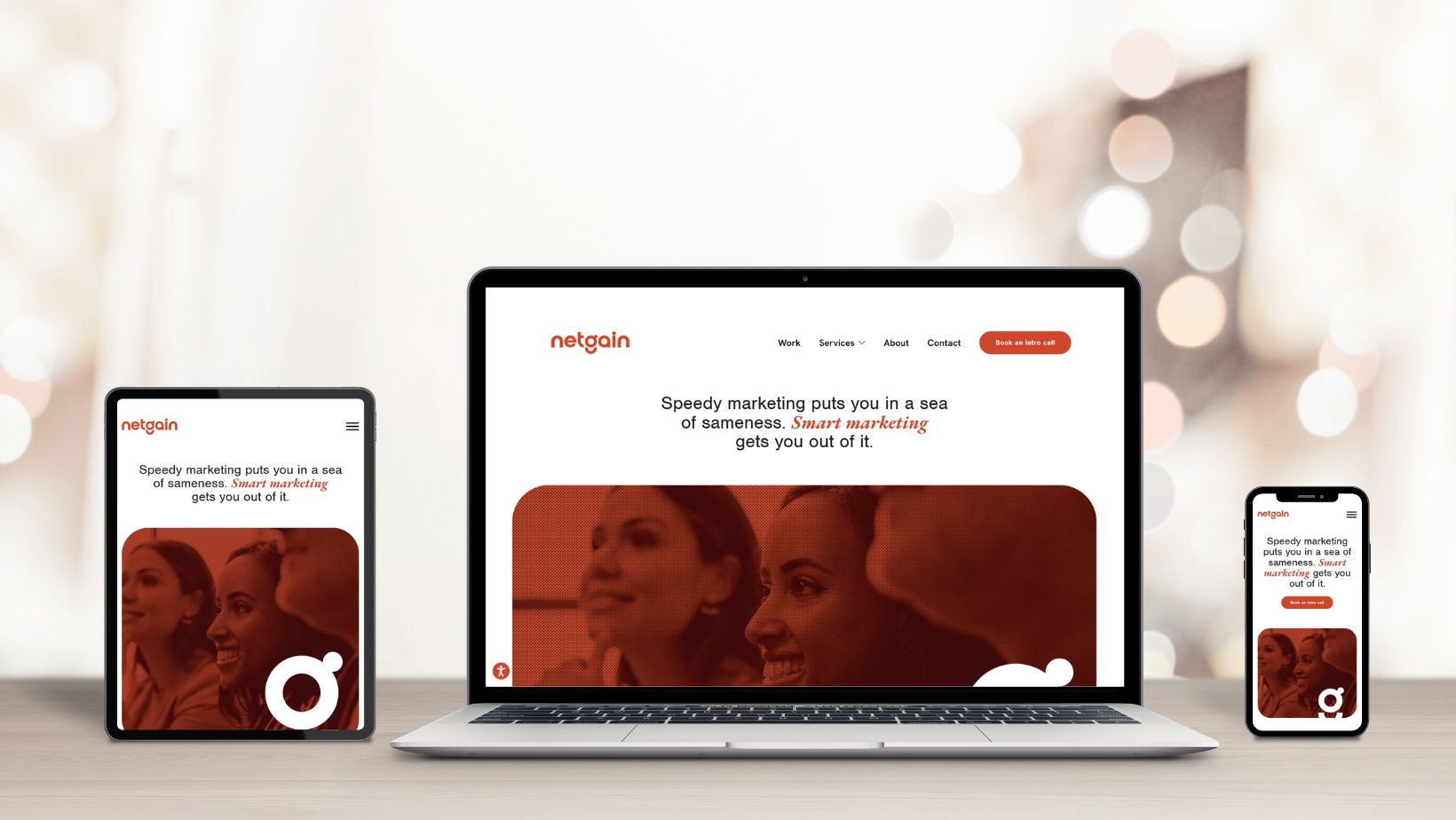
Someone might find you from their phone while sitting in a parking lot. Someone else might compare your services from a laptop at work. Another person might open your site on a tablet while watching TV, get distracted, and come back later on a different device.
Responsive web design is what makes that experience feel consistent.
At its simplest, it means your website automatically adjusts to fit the screen someone is using. The layout, images, text, navigation, buttons, forms, and page structure should all adapt so the site is easy to use on a phone, tablet, laptop, or desktop.
That sounds technical. And yes, part of it is. But the reason it matters is very human: people leave websites that are hard to use.
If your menu is awkward, your text is too small, your buttons are difficult to tap, or your content gets cut off on mobile, visitors may not stick around long enough to understand what you offer. Responsive design helps remove that friction.
Key Takeaways
- Responsive web design allows one website to adjust across different screen sizes, devices, and orientations.
- A responsive website is not just a smaller desktop site. It should rethink layout, navigation, content flow, images, forms, and buttons for each screen size.
- Responsive design supports a better user experience because visitors can read, browse, click, and convert without fighting the page.
- Mobile usability matters for SEO because Google primarily uses the mobile version of a site for indexing and ranking.
- Responsive layouts also support accessibility by helping content reflow properly for users who zoom in or use smaller screens.
- Older websites often show clear warning signs, such as tiny text, horizontal scrolling, slow mobile loading, or menus that are hard to use.
- The best responsive websites are planned around real user behaviour, not just technical breakpoints.
What Is Responsive Web Design?
Responsive web design, often shortened to RWD, is a way of designing and building websites so they respond to the user’s screen size, device type, and orientation.
Instead of creating one website for desktop and a separate version for mobile, responsive design uses one website that adapts. A page might show three columns on a desktop, two columns on a tablet, and one clean column on a phone. Images resize. Buttons stay usable. Text remains readable. Navigation changes so people can still move through the site without pinching, zooming, or guessing where to click.
The goal is not to make every version look exactly the same. The goal is to make every version work properly.
That distinction matters. A desktop layout has more space to spread out. A phone screen does not. Good responsive design knows the difference.
Where Responsive Web Design Came From
The idea of responsive web design was introduced by Ethan Marcotte in 2010, at a time when the web was moving beyond desktop screens. Smartphones and tablets were changing how people browsed, but many websites were still built as if every visitor was sitting at a computer monitor.
The old approach often involved separate mobile websites. You may remember URLs that started with “m.” before the domain name. That approach worked in some cases, but it also created extra maintenance, duplicate content concerns, and inconsistent user experiences.
Responsive design changed the thinking. Instead of building multiple versions of the same site, designers and developers could build one flexible system that responded to the screen.
That shift still shapes modern web design.
How Responsive Web Design Works
Responsive design is built through a combination of layout, code, content planning, and testing. It is not one single setting you turn on. It is a series of decisions that work together.
Fluid Layouts
A fluid layout uses flexible measurements instead of rigid, fixed-width sizing. Rather than saying a content area must always be 1,200 pixels wide, a responsive layout allows that area to grow, shrink, and rearrange based on the available space.
This keeps the site from breaking when the screen gets smaller.
A rigid layout might force users to scroll sideways on mobile. A fluid layout adjusts so the content stays within the screen.
Flexible Images And Media
Images, videos, graphics, and embedded content also need to adapt. A beautiful banner image on desktop can become a problem on mobile if it loads too slowly, crops awkwardly, or pushes important content too far down the page.
Responsive media should resize without distortion, load efficiently, and support the message of the page. The image should work with the layout, not fight against it.
Media Queries
Media queries are CSS rules that allow a website to apply different styles depending on screen size, orientation, resolution, or device characteristics.
For example, a website might use a larger navigation bar on desktop and a simplified menu on mobile. It might increase spacing on a tablet or stack content into a single column on a phone.
This is where design becomes more intentional. The site is not just shrinking. It is adapting.
Responsive Typography
Text needs just as much attention as images and layout.
On mobile, small text can make a page feel dense and frustrating. Long line lengths on desktop can also make content harder to read. Responsive typography adjusts font size, spacing, and line length so the content feels comfortable across devices.
A website can have strong copy and still lose people if the reading experience is poor.
Mobile-Friendly Navigation
Navigation is one of the easiest places for website responsiveness to fail.
A desktop menu may have room for several pages, dropdowns, and calls to action. On mobile, that same structure can quickly become cluttered. A responsive menu needs to help people find what they need without making them work for it.
This may mean a simplified menu, clearer labels, larger tap targets, sticky buttons, or a more direct path to high-value pages like services, contact, booking, or quote requests.
Forms And Calls To Action
Forms are often where conversions happen, so they need to work especially well on mobile.
A responsive form should be easy to complete with a thumb. Fields should be clear. Buttons should be large enough to tap. The form should not require unnecessary information. Error messages should be easy to understand.
The same applies to calls to action. A “Contact Us” button that looks fine on desktop may be too small on mobile. A phone number should be easy to tap. A quote request should not be buried below a layout that was only designed for a larger screen.
It is not only about how a website looks. It affects whether people take action.
Why Responsive Web Design Matters Now
Responsive design used to be treated as a nice upgrade. Now, it is the baseline.
People do not browse in one neat, predictable way. They move between devices. They search quickly. They compare options. They expect websites to load fast and make sense right away.
A responsive website helps meet those expectations.
It Supports A Better User Experience
User experience is the overall experience someone has while using your website. That includes how quickly the site loads, how easy it is to navigate, how readable the content is, and how simple it feels to take the next step.
Responsive design improves that experience by making the website feel natural on the device in front of the user.
Visitors should not have to pinch and zoom to read a paragraph. They should not have to rotate their phone to find a button. They should not have to scroll sideways to see the full page.
Every one of those moments adds friction. Enough friction, and the visitor leaves.
It Helps Build Trust
People make quick judgments online.
A website that looks broken on mobile can make a business feel outdated, even if the company is excellent at what it does. Fair or not, the website becomes part of the first impression.
Website responsiveness helps your site feel current, credible, and cared for. It shows that someone thought about the user’s experience. That matters, especially when the visitor is deciding whether to call, book, buy, request a quote, or trust your team with a project.
It Matters For SEO
Search engine optimization, or SEO, is the work of helping your website show up in search results when people are looking for what you offer.
Responsive design supports SEO in a few important ways.
Google uses mobile-first indexing, which means the mobile version of your website plays a major role in how Google understands and indexes your content. If your mobile experience is weaker than your desktop experience, that can create problems.
Website responsiveness also helps keep content consistent across devices because the same page and URL serve different screen sizes. This makes the site easier to manage and reduces the risk of important content appearing on desktop but not mobile.
Mobile usability, page speed, readable content, and clear structure all support a stronger search experience. It will not do all the SEO work on its own, but it creates a better foundation.
It Supports Accessibility
Accessibility means designing websites so more people can use them, including people with disabilities.
Website responsiveness plays a role here because content should be able to reflow. Reflow means the content can adjust within the viewing area when someone zooms in or uses a smaller screen, without forcing them to scroll both vertically and horizontally just to read.
This is especially important for people with low vision, people who enlarge text, and people using mobile devices.
A responsive website is not automatically accessible. Accessibility also includes colour contrast, keyboard navigation, alt text, headings, labels, and more. But responsive design is one piece of a more usable, inclusive web experience.
It Can Improve Conversions
A conversion is the action you want a visitor to take. That might be filling out a form, calling your team, booking a consultation, making a purchase, signing up for a newsletter, or downloading a resource.
Website responsiveness can improve conversions by making those actions easier.
On mobile, this might mean putting the phone number in a clear tap-to-call button. On desktop, it might mean giving users enough information before asking them to reach out. On every device, it means reducing confusion.
People are more likely to take action when the path is obvious.
Signs Your Website Is Not Responsive Enough
Some responsive issues are obvious. Others show up in smaller ways that quietly affect performance.
Your website may need responsive improvements if:
- Text is difficult to read on a phone.
- Users need to pinch and zoom to view content.
- The page requires horizontal scrolling.
- Buttons or links are too small to tap comfortably.
- Images crop awkwardly or push important content too far down the page.
- The navigation menu feels cluttered on mobile.
- Forms are frustrating to complete.
- Pages load slowly on mobile data.
- Content appears in a strange order on smaller screens.
- Important calls to action are missing or hard to find on mobile.
These issues are not just design problems. They can affect traffic, leads, sales, and trust.
Can Older Websites Be Made Responsive?
Yes, but the right approach depends on the site.
Some older websites can be improved through targeted updates. A developer may be able to adjust templates, fix layout issues, resize media, improve mobile navigation, and clean up page structure.
Other websites need a more complete rebuild. This is often the case when the site was built on outdated code, has a rigid layout, loads slowly, or was never designed with mobile users in mind.
The important thing is to look beyond appearance. A responsive update should not only make the site fit on a phone. It should make the site easier to use, easier to manage, and better aligned with how people actually move through the content.
What A Strong Responsive Website Should Include
A responsive website should feel simple to the user, even if a lot is happening behind the scenes.
Strong responsive design usually includes:
- A flexible layout that adapts across common screen sizes.
- Clear navigation that works on desktop and mobile.
- Readable text with comfortable spacing.
- Images and videos that resize properly.
- Fast-loading pages.
- Buttons that are easy to tap.
- Forms that are short, clear, and mobile-friendly.
- Content that appears in a logical order on every device.
- Calls to action that are visible without feeling aggressive.
- Testing across real devices, not just one desktop browser.
That last point matters. A design can look fine in a mockup and still behave poorly in the real world. Testing helps catch the details that users notice.
Responsive Web Design Is A Strategy Decision
Responsive design is sometimes treated like a development task. It is that, but it is also a strategy decision.
The way a website responds to different screens affects what people see first, what they read next, and how easily they can act. On a desktop, you may have room to introduce your brand, show supporting content, and include multiple paths forward. On mobile, the page needs to make faster decisions.
What matters most? What should the visitor see first? What can move lower? What should be shortened, simplified, or redesigned completely?
Those are not just technical questions. They are content, UX, SEO, and business questions.
Build A Website That Works Wherever People Find You
Responsive web design is no longer a trend or a technical bonus. It is part of building a website that respects the user’s time.
When your site works across devices, people can understand your business faster. They can move through your content with less friction. They can take action when they are ready, whether they are at a desk, on a phone, or somewhere in between.
If your website looks fine on desktop but falls apart on mobile, it may be quietly working against you.
A better website starts with a better plan. If yours is ready for a rethink, let’s talk.